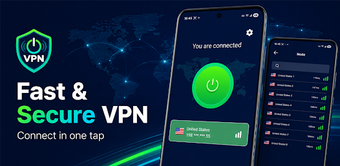
Simple one-tap VPN focused on United States nodes
Experience AceVPNLine, developed by JYE Solve, as a compact Android VPN aimed at securing mobile browsing and masking IP addresses. The app uses Android VPN permissions to create an encrypted tunnel and display live connection data for immediate privacy protection. Key elements include a one-tap connect button, selectable United States server nodes, and a visible session timer with extension controls. The tool suits Android users who need quick access to US-based IP addresses for routine browsing and public Wi-Fi protection.
What the app actually does for mobile privacy
AceVPNLine uses the standard Android VPN permission to establish an encrypted tunnel that masks the device's real IP address, and it reports the masked exit IP and traffic figures in real time. This means the app routes network traffic through remote nodes rather than modifying local apps. The live monitoring includes node name, connection duration, and basic traffic usage, helping users confirm when traffic is exiting through a US-based endpoint.
Does the app affect device performance during use?
The developer describes a lightweight footprint and minimal background configuration; in practice the interface prioritizes quick navigation over constant system services. Connections run as an Android VPN session, so CPU and battery impact are the same as other tunnel-based VPNs rather than an always-on service. For routine browsing the app's design avoids extra background processes, which reduces the chance of prolonged resource usage during short sessions.
Is it safe to use on mobile networks?
The app operates within Android's VPN framework and exposes Privacy Policy and Terms of Use from the settings, which supports transparency about data handling. Because it uses platform-level VPN permissions, the app intercepts traffic at the system level but does not require manual network configuration. Users should note that security depends on the chosen node and local network conditions; the app itself provides the tunnel and monitoring needed to verify an active encrypted session.
Do I need technical knowledge to operate it correctly?
AceVPNLine centers on one-tap connections and a minimalist layout, removing manual server configuration and advanced options. Built-in features include a searchable list of United States nodes and a session timer with extend controls, which let non-technical users manage session length without learning network settings. Power users who need multi-region endpoints or granular tunneling controls may find the app's simplified approach limiting.
The app is practical for everyday US-based browsing, with a clear trade-off
The app is a practical choice for Android users who want fast, low-effort access to United States IP addresses and visible session controls, thanks to its one-tap connection model and platform-level VPN operation. The main limitation is its focus on US nodes, which restricts users needing other regions. Tip: start sessions before joining public Wi-Fi and use the session-extension control to avoid unexpected disconnects.